
Download Oud Tuner – Tuner for Ud Oud Tuner, Music & Radio, Free Android App
Overview
Oud Tuner is a dedicated tuning tool designed for musicians who play Arabic and Turkish Oud instruments. Developed by KME Software, the app serves as a digital assistant for precise pitch calibration, helping users achieve optimal tuning accuracy. Its primary function is to assist in tuning individual strings by analyzing the incoming audio and displaying real-time pitch feedback.
The app supports 15 different tuning modes, accommodating various regional and stylistic tuning systems commonly used in Middle Eastern music. This makes it especially valuable for performers and students engaged in traditional Arabic and Turkish musical practices. The application is tailored for mobile use, offering a streamlined interface that enables quick access to tuning and metronome functions.
It is intended for both amateur players seeking to improve their instrument setup and professional musicians who require consistent tuning during rehearsals or recordings. While the developer did not provide additional details about the app’s background or broader product line, the focus remains on delivering a reliable tuning solution. Real-world use cases include on-the-go tuning before performances, practice sessions at home, or studio preparation.
The app’s noise filtering capability enhances usability in environments with ambient sound, making it suitable for both quiet and moderately noisy settings.
Key Features & Capabilities
- 15 Tuning Modes – Supports multiple traditional tuning systems used in Arabic and Turkish music, allowing users to select the most appropriate configuration for their instrument.
- Noise Filtering – Reduces background interference, enabling accurate pitch detection even in less-than-ideal acoustic conditions.
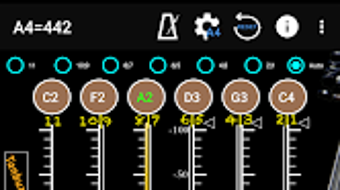
- Real-Time Pitch Display – Shows the current pitch on a visual panel, indicating whether the string is sharp or flat relative to the target frequency.
- String Calibration Function – Allows users to calibrate the app’s reference pitch using an open string, ensuring tuning precision based on their specific instrument.
- Visual Feedback System – Uses color-coded indicators (green for accurate, white for off-pitch) and directional arrows to guide users during tuning adjustments.
- 10 Quantile Precision Scale – Divides the tuning scale into 10 sub-bit increments for fine-grained pitch evaluation, enhancing accuracy.
- Integrated Metronome – Offers 18 beat modes ranging from Grave to Prestissimo, supporting a wide range of musical tempos and styles.
- Segment Beat Function – Enables users to set repeating rhythmic patterns for structured practice sessions.
- Pendulum Display Mode – Provides a visual metronome with a swinging indicator, aiding in maintaining steady timing during practice.
These features work together to create a comprehensive tool for both tuning and rhythmic training. Musicians can use the app to tune their Oud before a performance, adjust strings during rehearsal, or use the metronome to refine timing and phrasing. The visual feedback system ensures that even beginners can understand pitch deviations quickly, while advanced players benefit from the high-precision scale and calibration options. The integration of tuning and metronome functions on a single interface streamlines workflow, reducing the need for multiple apps.
User Interface, Workflow & Performance
The app presents a clean, intuitive interface that consolidates all essential functions on a single screen. Navigation is straightforward, with clearly labeled controls for tuning, calibration, and metronome settings. Users can switch between tuning and metronome modes with minimal effort, allowing for seamless transitions during practice.
The layout is optimized for touch interaction, making it easy to adjust settings with one hand. Workflow efficiency is enhanced by the unified design, where tuning feedback and rhythmic guidance are accessible without navigating through multiple menus. The app responds promptly to input, though exact performance details were not specified.
The developer did not provide information about CPU or RAM usage, so real-world behavior in terms of battery consumption or background performance remains unknown. Stability is assumed to be consistent with standard mobile applications, but no formal testing data was shared. General software behavior patterns suggest that the app operates smoothly under normal usage conditions.
The visual feedback system is responsive, with immediate updates to pitch indicators when strings are played. This contributes to an engaging and interactive user experience, particularly during tuning sessions.
Compatibility & System Requirements
Oud Tuner is designed for Android devices and is available as a free download. The app is compatible with a range of Android operating systems, though specific version requirements were not listed. Installation size is not specified, so users should account for variable storage needs depending on device and usage.
The developer did not provide exact system requirements, including minimum processor speed, RAM, or storage capacity. Compatibility information is limited to the platform, indicating that it runs on Android smartphones and tablets. No mention was made of support for iOS, Windows, or other operating systems.
Users should ensure their device supports audio input via the microphone for proper tuning functionality. The app relies on the device’s microphone to capture string vibrations, so performance may vary depending on microphone quality. For optimal results, users are advised to use the app in a quiet environment and position the microphone close to the instrument.
Pros and Cons
Pros
- Free to download and use, making it accessible to a wide audience.
- Supports 15 traditional tuning modes for Arabic and Turkish Oud instruments.
- Includes noise filtering for accurate tuning in noisy environments.
- Offers a high-precision tuning scale with 10 quantiles per sub-bit.
- Combines tuning and metronome functions in one intuitive interface.
- Features a calibration function for personalized pitch accuracy.
- Visual feedback with color indicators and directional arrows improves usability.
- Provides 18 beat modes and advanced metronome features like segment beats and pendulum display.
Cons
- Platform is limited to Android; no support for iOS or desktop operating systems.
- Exact system requirements and file size were not provided.
- No information on background performance or battery impact.
- Developer background and company details are not publicly available.
- Does not support multiple instrument types beyond the Oud.
FAQ Section
Is Oud Tuner available for iOS devices?
The app is currently available only for Android. There is no official version for iOS platforms.
Can I use Oud Tuner offline?
Yes, the app does not require an internet connection to function. All tuning and metronome features work offline.
How accurate is the tuning calibration?
The app includes a calibration function that allows users to align the reference pitch with their instrument’s open string, improving accuracy based on individual setup.
Does Oud Tuner require microphone access?
Yes, the app uses the device’s microphone to detect string vibrations. Permission must be granted for the app to access audio input.
Is Oud Tuner free to use?
Yes, the app is completely free to download and use with no in-app purchases or subscription fees.
Final Thoughts
Oud Tuner delivers a focused, well-structured solution for musicians specializing in Arabic and Turkish Oud instruments. Its combination of 15 tuning modes, noise filtering, and visual feedback makes it a reliable tool for precise pitch adjustment. The inclusion of a metronome with multiple beat modes and advanced timing features adds significant value, turning the app into a complete practice companion.
While the lack of detailed system requirements and platform limitations restrict broader accessibility, the app remains a strong choice for Android users in the Middle Eastern music community. The intuitive interface and free availability enhance its appeal, particularly for students and hobbyists. For professionals seeking a dependable tuning assistant, Oud Tuner provides a practical and efficient solution.
Its thoughtful design and feature integration reflect a deep understanding of the needs of its target audience. Download Oud Tuner now.







